 Until 31 October

Frustrated with document signing processes that are often time consuming and complex? What if, just like running payroll with Payfit, you could get everything done in a few clicks?
It’s why we’re thrilled to launch our new electronic signature feature, a way to help you get those all-important employment contracts, plus all your other HR documents, validated by the relevant parties in no time at all.
Signatures completed using Payfit are legally binding. All signed documents are securely stored in the same place that you run payroll, onboard new starters, manage leaves, absences and expenses, and oversee performance campaigns.
Let’s take a look at how Payfit’s electronic document signing feature can streamline yet more HR processes for your small business.
An electronic signature workflow that puts document senders in the driving seat
Autonomy, accuracy, reassurance, control. These are just some of the things we help small businesses experience when managing their payroll and HR. And the exact same goes for the electronic signature workflow.
How to create an electronic signature using Payfit
Powered by Yousign, a European leader in E-Signature, all signatures completed within Payfit are secure and legally binding.
Creating an electronic signature with us is so straightforward.
Documents can be added into a current or prospective employee’s record, so it’s simple to find and send them for signature. Admins can specify exactly who is required to sign a document, either by entering an employee’s name, or manually inputting email addresses if they’re not part of your organisation. You can even specify if you want people to sign your document in a particular order.

Signature, date and free text boxes can be added wherever you choose in the document, for example to create evidence of when something has been signed, or to gather signatures for specific sections of your document. Clear labelling helps signatories understand exactly where and what to write.
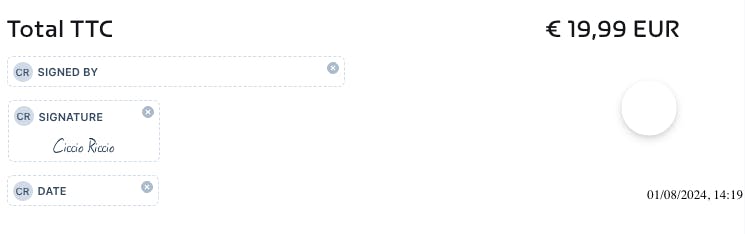
Simple ‘in progress’, ‘completed’ and ‘expired’ tabs will keep you in the loop as to what’s been done, what needs to be chased, or if the deadline to sign has passed.
Making the signing process as simple as possible for your signatories
Our electronic signature feature reduces the time to sign, increases signing rates, and creates a straightforward process for your signatories.
Letting recipients know how to sign electronic documents using Payfit
Designated signatories will receive an email notification from Payfit asking them to sign the document, and can get to it in one click. Once they hit the ‘sign’ button, for added security, signatories will need to enter a code that will be sent to their email addresses, so you’re certain your important documents are being completed by who you intend them to be.
They’ll be able to slide a bar to add a predefined signature font, or click to draw their own. Yep, that’s it! Once the document has been signed by all parties, the signatories receive a confirmation email, and the document can then be downloaded from Payfit. No need to print! New starters signing documents become more autonomous from the very start of their journey with you, and can access these documents whenever they need to from their own personal space.
As Europe’s leading cloud-based payroll solution, we offer all the tools you need to manage and pay your people, and are trusted by over 16,000 small businesses. Alongside payroll, you’ll find a whole suite of HR features including leave & absence management, expenses, performance reviews, the ability to create an org chart, and more.
And, as of now, electronic document signing too.
Be one of the first to find out all about it, by booking in a quick demo of Payfit with a member of our team.
Want to experience the future of payroll?


